Customer Support Procedure
Document Authorisation Audit
This document has been approved & authorised by:
Approved By | Release Date | Next Review |
|---|---|---|
Richard Coates |
|
|
Rachael Peters |
|
|
Dale Robertson |
|
|
Dale Robertson |
|
Contents
Introduction
The Customer Support Procedure is a comprehensive guide to providing exceptional assistance to our valued customers. In this overview, we'll outline the fundamental principles and key components of our customer support process.
Purpose
The primary objective of our Customer Support Procedure is to ensure that all customer enquiries, issues, and concerns are addressed promptly, effectively, and with the highest level of professionalism. By following this procedure, we aim to enhance customer satisfaction, foster trust and loyalty, and uphold our commitment to delivering outstanding service.
Scope
This procedure encompasses the entire Customer Support workflow, from initial contact with customers to the resolution of their queries or issues. It applies to all members of the Customer Support & Customer Success team, as well as relevant stakeholders across the organisation.
Related Documents
Useful Links
3t Digital Help Centre - https://3tenergy.atlassian.net/servicedesk/customer/portals
3t Digital Customer Portal - https://3tenergy.atlassian.net/servicedesk/customer/portal/2
3t Digital Knowledge Hub - https://3t Digital.scrollhelp.site/
Jira Support Board - https://3tenergy.atlassian.net/jira/servicedesk/projects/SUP/queues/custom/7
Definitions
Software Issue | Refers to an error, flaw, failure, or fault in a Software that causes it to produce an incorrect or unexpected result or to behave in unintended ways. |
Portal | A web-based platform that provides a single point of access to a variety of information including allowing the user to raise a ticket with Customer Support. |
SLA | Service Level Agreement - a commitment between a service provider and a client. |
Resolution | A team member has provided a resolution to the issue raised (even if it's a temporary fix with a permanent solution to follow) within the set timescales, giving the requester/reporter a solution so the ticket can be moved to client sign-off status. |
Responsibility
Customer Support Team | The 3t Digital customer support team serves as the exclusive point of contact for any system-related questions, queries, or bug reports related to our digital software platforms or e-learning services. They provide links from the Knowledge Hub, which include guides to help resolve customer issues and queries. They also ensure that tickets in the Support Board are kept up to date for reporting purposes. |
Support Types
Technical Support
Technical support, often referred to as tech support, is a service provided by technology companies to help users troubleshoot and resolve issues with our Software. The primary goal of technical support is to assist users in solving specific problems related to our software solutions the client utilise, or other technical aspects of our product.
We can provide technical support through various channels including phone, email, live chat, online tutorials, forums, and on-site visits. The level of support may vary from basic assistance for general users to advanced support for more complex technical issues typically required by businesses or advanced users.
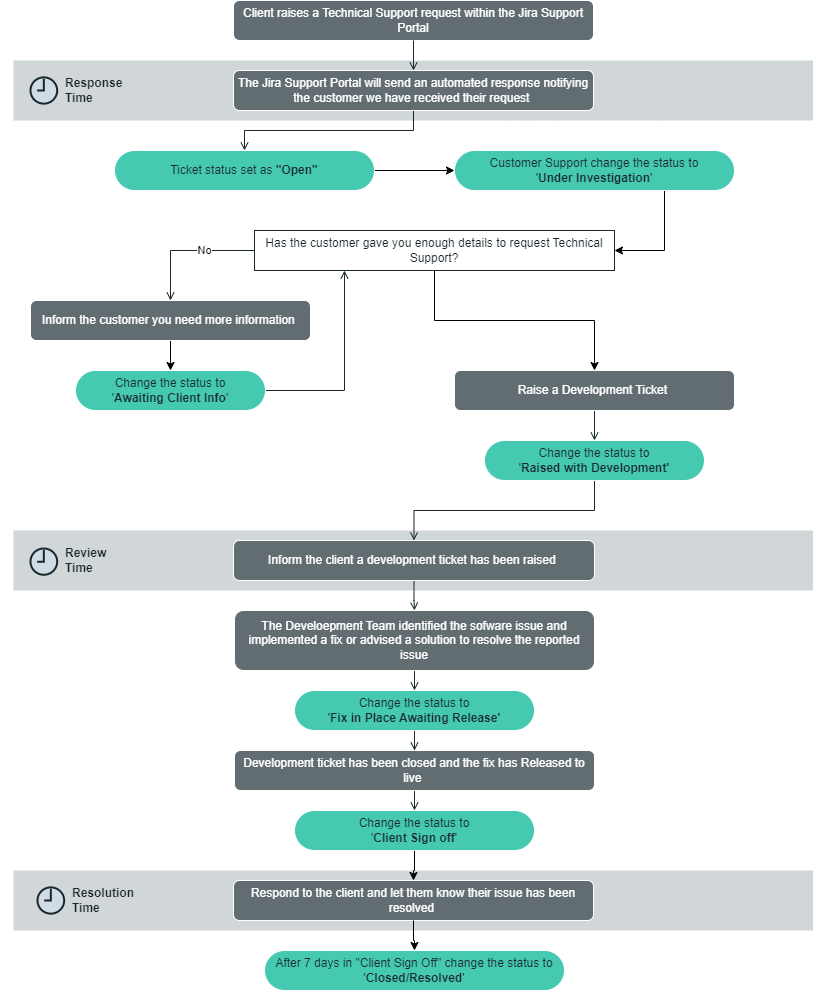
Technical support requests raised within the Jira Support Portal are subject to varying SLA timescales based on their priority severity. It is crucial for the Customer Support & Development Team to address these requests within the designated SLA timelines.
Technical Support Process Flow
Technical Support Severity
The priority of the Technical Support requests are determined by the severity of the issue and the impact it’s having on the client and their business. The definitions of the severities are shown below, it’s important all members of the Customer Support team are aware of these different categories so tickets can be escalated appropriately.

It is important that the severity of the ticket is set correctly for reporting purposes
Severity | Description |
|---|---|
Highest (Priority 1) | Technical Support requests should only be raised if the system is unavailable during normal operating hours. Typically, an infrastructure issue causing an unplanned interruption making the services unavailable. These requests must be raised in the 3t Digital Support Portal using the ‘Technical Support’ option with the priority set to ‘Highest’ |
High | Technical Support requests should be set to a high priority if an unplanned interruption occurs that makes some functionality unavailable during normal working hours. These requests must be raised in the 3t Digital Support Portal using the ‘Technical Support’ option with the priority set to ‘High’ |
Medium (Priority 3) | Technical Support requests should be set to a medium priority if certain functunality works but impaired for large group of users during normal operating hours. These requests must be raised in the 3t Digital Support Portal using the ‘Technical Support’ option with the priority set to ‘Medium’ |
Low | Technical Support requests should be set to a low priority if a cosmetic or inconvenient fault which does not impact the operating efficiency of the product or the use of the product. These requests must be raised in the 3t Digital Support Portal using the ‘Technical Support’ option with the priority set to ‘Low’ |
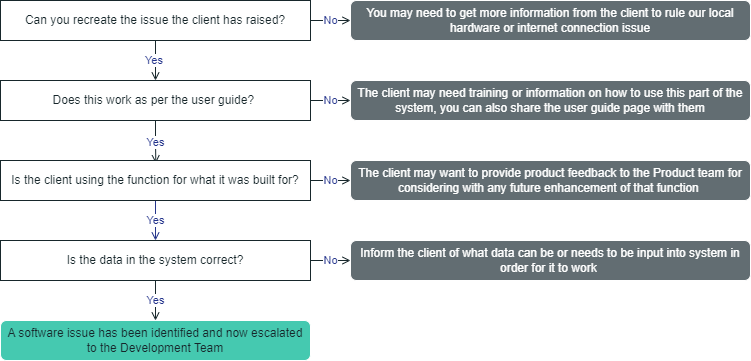
Defining a Technical Support Request
Before raising an “Internal Support Request” ticket with the Development team, the Customer Support team must ensure the the request raised is a genuine software issue. The below steps must be followed to help determine if the ticket is a software issue or user/data error.
Support Queries
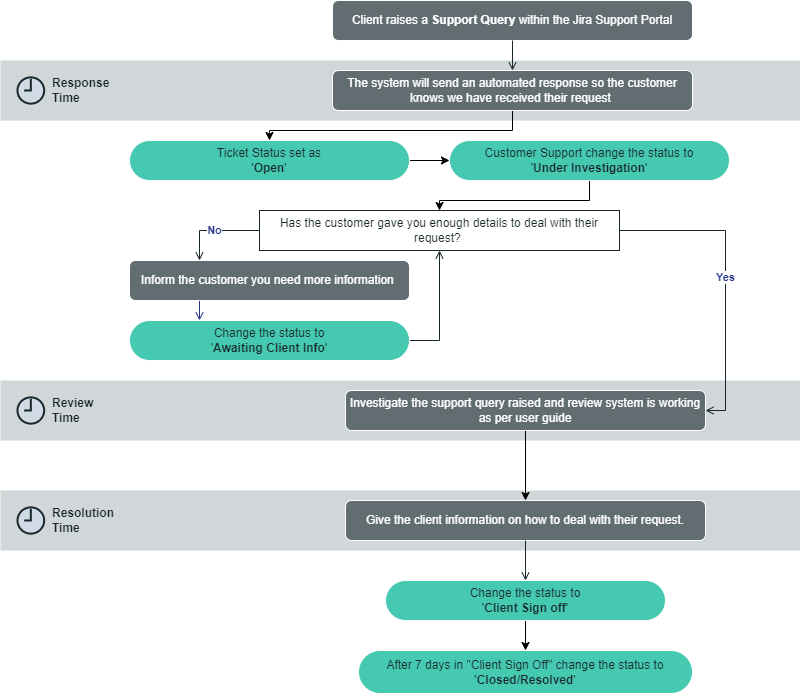
A support query is a request or enquiry submitted by a customer seeking assistance or information related to our products or services. These queries typically cover a range of topics, such as technical issues, account management, feature requests, or general questions about the product. Support queries are handled by the Customer Support team, who aim to provide timely and effective responses to address the customer's needs and ensure their satisfaction. Each support query is logged, tracked, and managed through the Jira ticketing system, allowing for efficient resolution and follow-up.
Support Process Flow
Service Task
A service task request is request from the client to assist with updating data within our Software platform. Typically these can be tasks that are usually carried out by the client or other 3t Division and they are requesting the assistance of the 3t Digital Customer Support team.
These tasks are chargeable and prices will be based on the time the specific task takes the Support Team to complete.
Service Task Process Flow
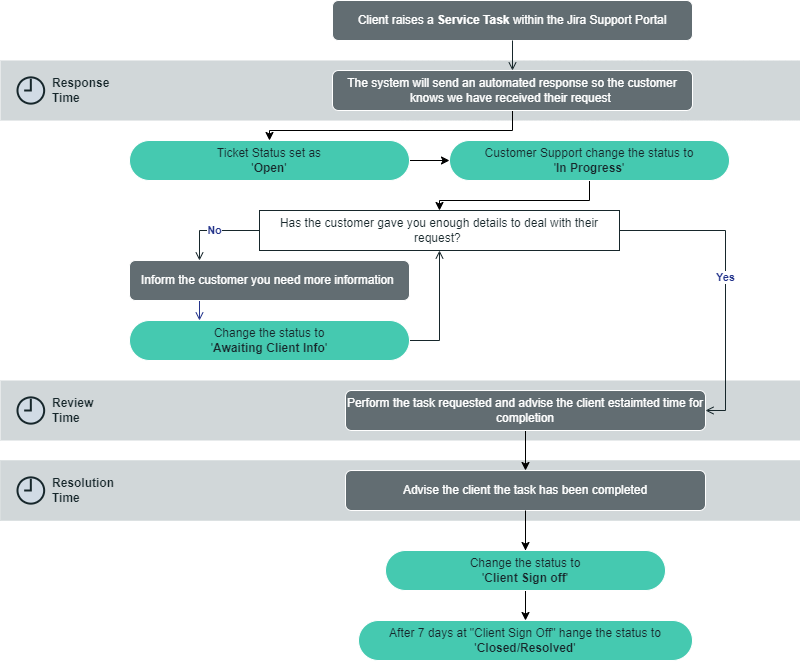
Response & Action Timescales

This is an extract from Service Level Agreement (SLA)
Overview of the Customer Support Team SLA & Timelines
At 3t Digital, we understand the importance of timely resolution and value our clients' time. Our Service Level Agreement (SLA) timelines are designed to ensure efficient management of Jira tickets raised by our clients.
Upon ticket submission, our team strives to acknowledge and assess the issue within below timelines. Depending on the complexity of the query, our goal is to provide an initial response within this timeline and to keep you informed and engaged throughout the process.
For standard issues, we aim to have a resolution within timescale below depending on the type of ticket raised. Our dedicated team of experts will work diligently to address your concerns, provide solutions, and offer guidance to ensure your satisfaction.
In case of more complex or technical matters, our team may require additional time to thoroughly investigate and resolve the issue. Rest assured, we will maintain regular communication and keep you updated on the progress until a resolution is reached.
Our commitment is to deliver prompt and effective support while maintaining the highest quality standards. We continuously strive to exceed our SLA timelines and provide exceptional service, ensuring a smooth and seamless experience for our valued clients.
Required Actions
There are 3 main actions that must complete for every ticket that is raised from the portals.
Action | Description |
|---|---|
Response | The requester/reporter must receive a response within the set timescales to acknowledge the query and inform them that the ticket has been created and is under review. |
Review | A team member must investigate the ticket and inform the requester/reporter of the next steps or actions taken within the set timescales. This may include raising a development ticket, providing a link to a user guide, arranging further training sessions, etc. |
Resolution | A team member has provided a resolution to the issue raised (even if it's a temporary fix with a permanent solution to follow) within the set timescales, giving the requester/reporter a solution so the ticket can be moved to client sign-off status. |
Timing of Actions
Listed below are the types of issues that can be raised and timings of when they will be dealt with as per the agreed SLA’s.

The timescales listed are working hours/days
Type | Response | Review | Resolution |
|---|---|---|---|
Technical Support - Highest (P1) | 30 mins | 1 hour | 4 hours |
Technical Support – High (P2) | 30 mins | 4 hours | 2 days |
Technical Support – Medium (P3) | 30 mins | 1 day | Next Sprint (within 14 days) |
Technical Support – Low (P4) | 30 mins | 1 day | Next Available Sprint |
Support Query | 30 mins | 1 day | 3 days |
Service Task | 30 mins | 3 days | Prioritised by Customer Excellence Manager |
Working Hours (Time zone = GMT (Greenwich Mean Time))
Day | Opening Time | Closing Time |
|---|---|---|
Monday | 08:00 | 16:00 |
Tuesday | 08:00 | 16:00 |
Wednesday | 08:00 | 16:00 |
Thursday | 08:00 | 16:00 |
Friday | 08:00 | 16:00 |
Saturday | Closed | Closed |
Sunday | Closed | Closed |
How to Create a ticket within the 3t Digital - Help Centre
Raising Issues & Requests - Help Guide
This document outlines the process for reporting bugs and submitting requests for 3t Digital products. It covers how to use the portals, the necessary information to include, and the expected timescales for addressing issues and requests.
Document Authorisation Audit
This document has been approved & authorised by:
Approved By | Release Date | Next Review |
|---|---|---|
Lauren Peters |
| |
Dale Robertson | ||
Dale Robertson | 11/01/2023 |
|
Contents
3t Digital Help Desk
At 3t Digital, we are dedicated to providing exceptional support for our software solutions and e-learning services. Our Help Desk is your go-to resource for assistance, whether you're experiencing technical issues, have questions about our products, or need guidance on using our services.
Please click on the 3t Digital Help Desk link below to see our Help Desk
How to Contact Our Customer Support Team:

Contact Us
Send an email detailing your issue or query to our support team. Be sure to include as much information as possible to help us assist you more efficiently.

Raise a Ticket
Log in to our support portal to submit a ticket. You can track the status of your ticket and communicate directly with our support team through this platform.
How to Raise A Ticket
Step 1 - Open the 3t Digital Help Desk portal using the above link
Step 2 - Select “Digital - Customer Support” under the Featured portals section
Step 3 - Select the Support Type that most suits the request your are raising
Step 4 - Populate all fields with as much information as possible and click send
Support Ticket Type
If tickets are not raised correctly, there may be a delay in dealing with your request or the ticket may be closed due to lack of information.
Please click on the Ticket Type below for more information on raising this type of ticket:
Ticket Type | Definition | Who can raise? | 3t Digital Team - Responsible |
|---|---|---|---|
A user has found an error, flaw or fault that is causing the system to produce an incorrect or unexpected result. | All users | Customer Support | |
A user has a general query regarding the Software Solution or E-Learn they are using | All users | Customer Support | |
Request assitance from the Customer Support for certain tasks that would usally be completed by the client | All users | Customer Support |
Managing Duplicate Jira Tickets
Occasionally, multiple users within the same organisation may encounter the same issue with 3t Digital products and submit separate Jira tickets. These users might belong to different departments or divisions and may not be aware of the other tickets.
In such cases, the duplicate tickets will be closed and linked to the original ticket. All relevant users will be added as requested participants to the original ticket to ensure they receive all necessary notifications.
Escalation of Customer Support Tickets
If your ticket is not being updated or resolved promptly, or if the reported issue remains unresolved, please add a note to your ticket requesting escalation to the Customer Excellence Manager for further investigation.
Ticket Status Definitions
The below table describes the different status on tickets within the support portal.
STATUS | DESCRIPTION |
Open Issue | The ticket has been raised but there has been no action taken yet |
Under Investigation | A member of the team is looking at your ticket and is carrying out an initial investigation |
In Progress | A member of the team is activley working on the Service Task |
Awaiting Client Info | A member of the team has looked at your ticket but requires more information from the requester |
Raised with Development | The support team have completed their investigation and require assistance from the development team to close your request. A development team has been raised for one of the developers to look at. |
Fix in Place Awaiting Release | The development team have completed their development work and it will be in the live site on the next release |
Client Sign Off | The fix has been released and the team are waiting for the requester to confirm their issue has been resolved |
Closed/Resolved | The issue has been resolved and there is no further action required |
Customer Support Performance
Performance reports are available in Jira for regular monitoring to ensure SLAs and procedures are being correctly followed and to identify areas for improvement. The monthly reports will include the following information:
Created & Resolved Issues
Technical Support tickets Raised
Support Queries tickets Raised
Tickets per severity
Tickets per Client
Tickets per Software Solution
Review, Response & Resolution Time Acheived
Average Time Tickets are in the status for
Various Reports can be found in Jira following the links below: